

The Hidden Risk of Printing Controlled Information
When organizations discuss protecting Controlled Unclassified Information (CUI), the conversation usually focuses on digital security. Endpoint protection, multi-factor authentication, encryption, access controls, and continuous monitoring often receive the most attention.
While these safeguards are important, they are only part of the picture.
A common misconception is that printing Controlled Unclassified Information is either prohibited or presents minimal risk compared to cyber threats. In reality, printing can introduce one of the most significant exposure points within a Cybersecurity Maturity Model Certification (CMMC) Level 2 environment.
Once information is printed, it leaves monitored systems and enters the physical world. The technical safeguards that help protect digital data become less effective, and the responsibility shifts to physical security measures, documented procedures, and employee accountability.
But the risk does not begin when the paper lands in the output tray. When digital CUI is printed, the information may pass through a workstation, print server, network connection, printer or multifunction device, and internal device storage before becoming a physical document. Each of those touchpoints may affect how the organization protects, scopes, and documents the CUI environment.
For defense contractors handling sensitive government information, this creates an important compliance question:
What does the CMMC framework actually require when information is printed?
The answer depends in part on how the information reaches paper. Receiving CUI as a physical document is not the same as taking digital CUI from a controlled system and sending it to a printer. When digital CUI is printed, additional systems, devices, and physical locations may become part of the information flow that your organization must protect and document.
2026 CMMC Status Update: What Defense Contractors Should Know
As of 2026, defense contractors still need to maintain a clear understanding of where CUI is processed, stored, transmitted, and physically handled. Current CMMC requirements continue to place significant emphasis on accurate scope definition, implementation of applicable NIST SP 800-171 safeguards, and evidence that those safeguards are operating as intended.
For printing, this means organizations should look beyond the final paper document. The systems and devices involved in creating the printed copy may also become part of the CUI flow and may affect assessment scope.
What Is CUI and Why Does Printing Change the Risk?
Controlled Unclassified Information refers to government information that requires safeguarding or dissemination controls under federal laws, regulations, or government-wide policies. Defense contractors frequently encounter this information through Department of Defense contracts and programs that require compliance with DFARS 252.204-7012 and NIST SP 800-171.
Within digital systems, organizations typically implement layers of protection, including:
| Access controls | |
| Security monitoring | |
| Audit logging | |
| Encryption | |
| Data loss prevention technologies |
These controls provide visibility into who accessed information, when it was accessed, and how it was used.
Printing changes that dynamic.
Once digital CUI is sent to a printer, the organization must consider more than the electronic file itself. The information may move through additional systems and devices before becoming a physical document, and the printed copy must then be protected through physical security, handling procedures, and employee accountability.
Paper-Only CUI vs. Printing Digital CUI
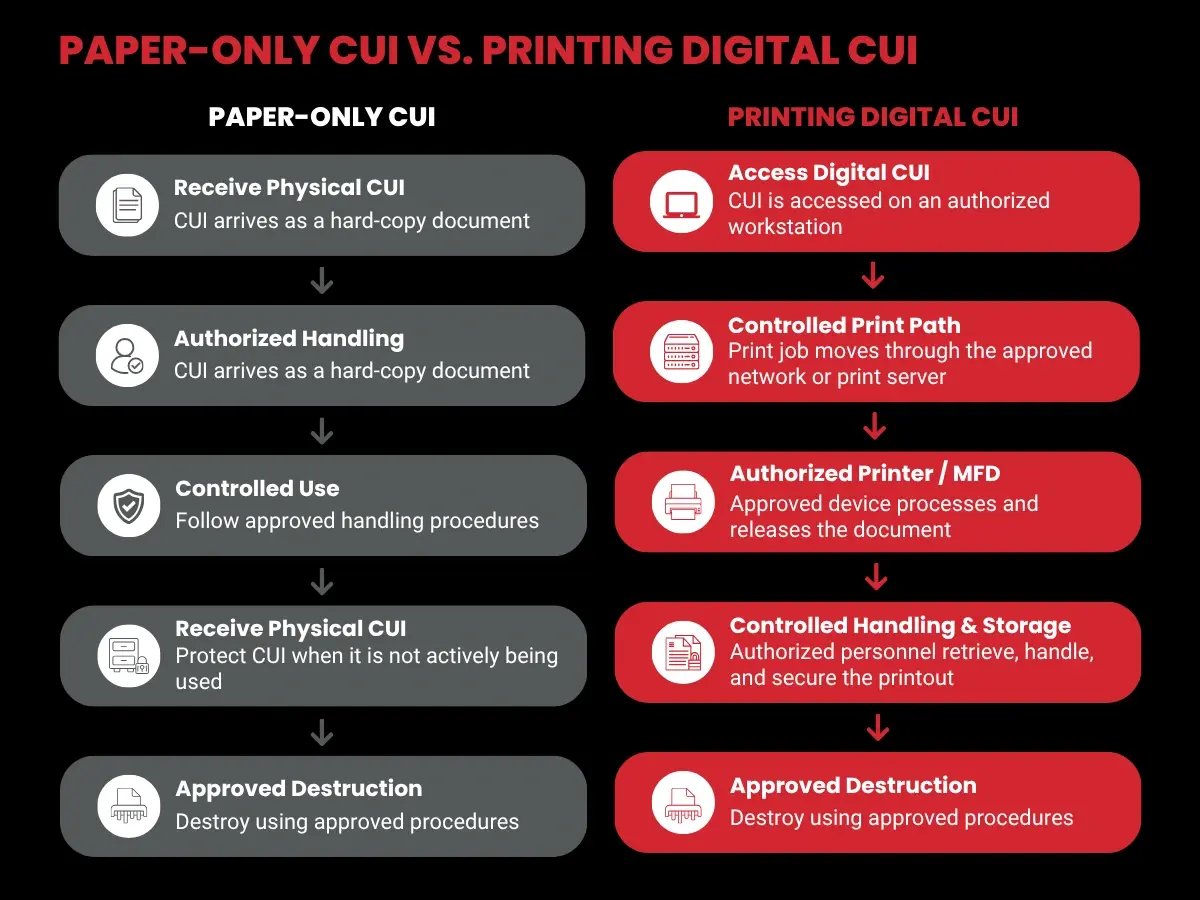
Not all printed or physical CUI follows the same path. There is an important operational difference between receiving CUI that already exists in physical form and taking digital CUI from a controlled environment and printing it.
Understanding that distinction helps contractors identify where CUI actually travels and which technical and physical safeguards need to be considered.
Receiving and Handling Paper-Only CUI
A contractor may receive CUI as a physical engineering drawing, technical specification, document package, or other hard-copy record. If that information remains exclusively in physical form, the organization should focus on how the document is accessed, handled, transported, stored, and destroyed.
| Who is authorized to access the document | |
| Where the document may be used | |
| Where it is stored when unattended | |
| How it may be transported | |
| How unauthorized access is prevented | |
| How it is destroyed when no longer needed |
The important distinction is that the contractor received the information in physical form rather than creating the hard copy from CUI processed within a digital environment.
Printing Digital CUI
Printing digital CUI creates a different path. An employee may open a CUI engineering drawing on an authorized workstation and send it to a network-connected printer. Before the drawing becomes paper, the print job may pass through several technical components.
| Workstation | |
| Network | |
| Print server or print queue | |
| Printer or multifunction device | |
| Internal printer memory or storage | |
| Output tray |
Once the page is produced, the organization must also consider who retrieves it, where it is taken, how it is stored, whether it is transported, and how it is ultimately destroyed.
Key Takeaway: Paper-only CUI and printing digital CUI create different information paths. Contractors should understand the path the information actually takes instead of treating every hard-copy scenario the same way.
Can You Print CUI Under CMMC?
Many defense contractors rely on printed documents to support engineering reviews, manufacturing activities, quality assurance processes, logistics operations, and program management functions. Physical copies remain a practical business requirement in many environments.
Printing CUI is not automatically prohibited. What matters is whether the organization understands how CUI moves through the printing process and applies appropriate safeguards to the technical and physical components involved.
That means looking beyond the paper itself. Contractors should consider the system where the CUI originates, the path used to transmit the print job, the printer that processes it, any device storage involved, and the physical controls applied after printing.
The practical question is not simply, “Can we print CUI?” It is, “Can we identify and protect every place the CUI goes when we print it?”
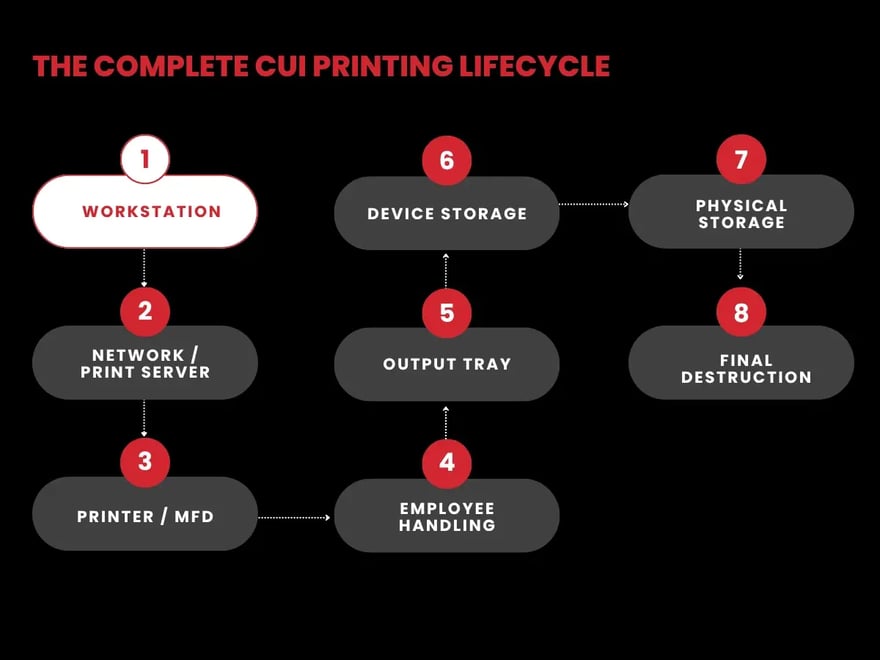
The Complete CUI Printing Lifecycle
Printing should be evaluated as a complete information flow rather than a single action. From the moment an employee opens digital CUI to the point when the final paper copy is destroyed, the information may pass through multiple technical and physical touchpoints.
Workstation
The lifecycle begins at the workstation where the employee accesses the CUI and initiates the print job. Organizations should understand whether that endpoint is authorized to process CUI and whether it sits inside the defined CUI environment.
Consider:
| Is the endpoint authorized? | |
| Can CUI be downloaded locally? | |
| Can users print to any printer? | |
| Are printer destinations restricted? | |
| Is the endpoint represented accurately in the organization's scope and documentation?How unauthorized access is prevented |
Reader takeaway:
The first printing risk exists before the document reaches the printer.
Print Server or Network
After the employee selects Print, the job may travel across the network or through a print server before reaching the device. Print queues and spool files may temporarily process or retain information.
Consider:
| Where does the job travel? | |
| Does it cross network segments? | |
| Is a print server involved? | |
| Are jobs cached? | |
| Who can administer the print queue? | |
| Is that infrastructure represented in the CUI data flow? |
Reader takeaway:
The print path matters, not just the destination printer.
Printer or Multifunction Device
Modern printers and multifunction devices can contain network interfaces, administrative portals, operating systems, scanning functions, email capabilities, USB ports, cloud integrations, and internal storage.
Consider:
| Is this printer approved for CUI? | |
| Who can administer it? | |
| Which features are enabled? | |
| Can users scan to email? | |
| Can users scan to cloud storage? | |
| Can USB devices be connected? | |
| Can the printer communicate with external services? |
Reader takeaway:
Treat the printer according to what it can actually do, rather than assuming it is a passive office device.
Printer Internal Storage
Some printers and multifunction devices may temporarily or persistently retain information associated with print and scan jobs. Organizations should understand the storage capabilities and configuration of the devices they use for CUI.
Consider:
| Does the device have internal storage? | |
| Are completed jobs retained? | |
| Is storage protected? | |
| Are jobs automatically deleted? | |
| What happens during servicing? | |
| What happens if the drive is replaced? | |
| What happens when the printer is retired? |
Output Tray
When the page exits the printer, CUI becomes immediately accessible to anyone who can physically reach or view the output.
Consider:
| Is the printer in a controlled area? | |
| Can unauthorized employees walk past it? | |
| Can visitors access the area? | |
| Are documents immediately retrieved? | |
| Is secure print release available? |
Possible safeguards:
| PIN release | |
| Badge release | |
| User-authenticated printing | |
| Dedicated printer | |
| Restricted printer location |
Employee Handling
Once printed CUI is retrieved from the printer, responsibility shifts from the printing infrastructure to the people handling the physical document. Employees should understand what they are permitted to do with printed CUI from the moment they pick it up until it is returned to secure storage or destroyed.
Organizations should establish clear procedures covering who is authorized to retrieve printed CUI, where the document may be viewed or used, and whether it may be moved between controlled work areas. Employees should also know how to protect the document when other personnel, visitors, vendors, or unauthorized individuals are nearby.
Particular attention should be given to transportation. If printed CUI must be moved between offices, facilities, job sites, or other approved locations, the organization should define how the document is protected while in transit and who is responsible for maintaining control of it.
Employees should also know what to do when something goes wrong. A missing document, an unattended printout, accidental exposure to an unauthorized individual, or a document sent to the wrong printer should be handled according to the organization's established incident-reporting procedures.
Organizations should consider:
| Who is authorized to retrieve printed CUI? | |
| Can employees leave the document unattended while actively using it? | |
| Where may printed CUI be viewed or used? | |
| Who is permitted to carry or transport it? | |
| How should it be protected during transportation? | |
| What should an employee do if CUI is lost, misplaced, or exposed? | |
| When should the document be returned to secure storage? | |
| How do employees know when and how the document should be destroyed? |
Practical example: An engineer prints a controlled technical drawing for use during a production review. The responsibility does not end when the engineer retrieves the drawing. The employee should know where the drawing may be used, who may view it, where it must be stored during breaks or after the meeting, and what to do with it when it is no longer needed.
Key Point: A well-configured printer cannot compensate for poor handling after the document is retrieved. Employee behavior remains part of protecting printed CUI throughout its lifecycle.
Physical Storage
When printed CUI is not actively being used, it should be stored according to the organization's approved physical safeguarding procedures. The goal is to prevent unauthorized individuals from viewing, accessing, removing, or otherwise obtaining the information.
Storage requirements should account for more than long-term filing. Organizations should also consider what happens to documents during lunch breaks, meetings, shift changes, overnight periods, temporary work interruptions, and other times when an authorized employee is no longer directly controlling the document.
For example, printed CUI should not simply remain on an unattended desk, conference room table, open shelf, or other location where unauthorized personnel could access it. Your current article already identifies desks, conference rooms, open shelving, and unsecured filing locations as common weaknesses.
Depending on the organization's environment and approved procedures, physical safeguards may include locked storage, restricted-access rooms, controlled workspaces, and clean desk practices.
Organizations should consider:
| Where may printed CUI be stored? | |
| Who has access to the storage location? | |
| Is the storage area accessible to visitors or unauthorized personnel? | |
| Are documents secured when employees leave their work areas? |
|
| Are clean desk procedures clearly defined and consistently followed? | |
| Is temporary storage addressed for meetings and shared workspaces? | |
| Are employees provided with appropriate secure storage? | |
| Are physical CUI procedures addressed for approved remote or home-work environments? | |
| Is access to storage areas consistent with the organization's documented procedures? |
Temporary Storage Matters Too
A common mistake is thinking only about where CUI is stored overnight. Short periods of unattended storage can create exposure as well.
For example, an employee may bring printed CUI into a conference room for a meeting and leave the documents behind when the meeting ends. Another employee may leave a document on a desk while stepping away for lunch. These situations should be addressed by the organization's physical handling and clean desk procedures.
Remote and Home Work Require Additional Attention
If the organization permits employees to use printed CUI outside its primary facility, the same questions should be addressed for that environment. The organization should define where the document may be used, how unauthorized household members or other individuals are prevented from accessing it, where it is stored when unattended, and how it will be returned or destroyed according to approved procedures.
Key Point: Secure storage is not just about having a locking cabinet. The organization should know where printed CUI can exist when it is not actively being used and how unauthorized access is prevented at each approved location.
Final Destruction
The CUI printing lifecycle does not end when an employee is finished using the document. Printed CUI remains sensitive until it is disposed of using the organization's approved destruction process.
Simply placing a document in an ordinary trash or recycling container may expose the information to unauthorized access. The destruction process should ensure that the information cannot be readily reconstructed, recovered, or accessed after disposal. This builds directly on your existing draft, which states that physical records should be destroyed in a manner that prevents reconstruction or recovery.
Organizations should establish procedures that address both how documents are destroyed and what happens before destruction occurs. For example, if employees place documents in designated destruction containers for later shredding, access to those containers should be considered until the documents are actually destroyed.
Organizations should consider:
| Which destruction methods are approved for printed CUI? | |
| Where should employees place documents awaiting destruction? | |
| Are destruction containers appropriately controlled? | |
| Who is authorized to collect material awaiting destruction? | |
| Can unauthorized personnel access documents before destruction? | |
| Is shredding performed internally or by a third-party vendor? | |
| If a vendor is used, how is the material protected before and during collection? | |
| Are physical CUI procedures addressed for approved remote or home-work environments? | |
| Are vendor responsibilities and access appropriately addressed? | |
| Does the organization require records or other evidence of destruction? | |
| How does the organization verify that employees consistently follow the approved process? |
Do Not Overlook the Period Before Destruction
There may be a gap between an employee deciding that a document is no longer needed and the document actually being destroyed.
For example:
Employee finishes with CUI → Document enters destruction container → Material is collected → Material is transported or transferred → Final destruction
The information still requires protection throughout that process.
This means an organization should not focus only on the shredder. It should understand the entire disposal path.
Third-Party Destruction Vendors
If a third-party vendor is involved, the organization should understand how printed CUI is controlled before it reaches final destruction. Consider who can access the material, how it is collected, how it is transported, and what documentation is maintained under the organization's approved process.
Key Point: Disposal is not complete when CUI enters a destruction bin. The lifecycle ends when the information has been destroyed according to the organization's approved process and can no longer be recovered or reconstructed.
What Your CUI Printing Policy Should Address
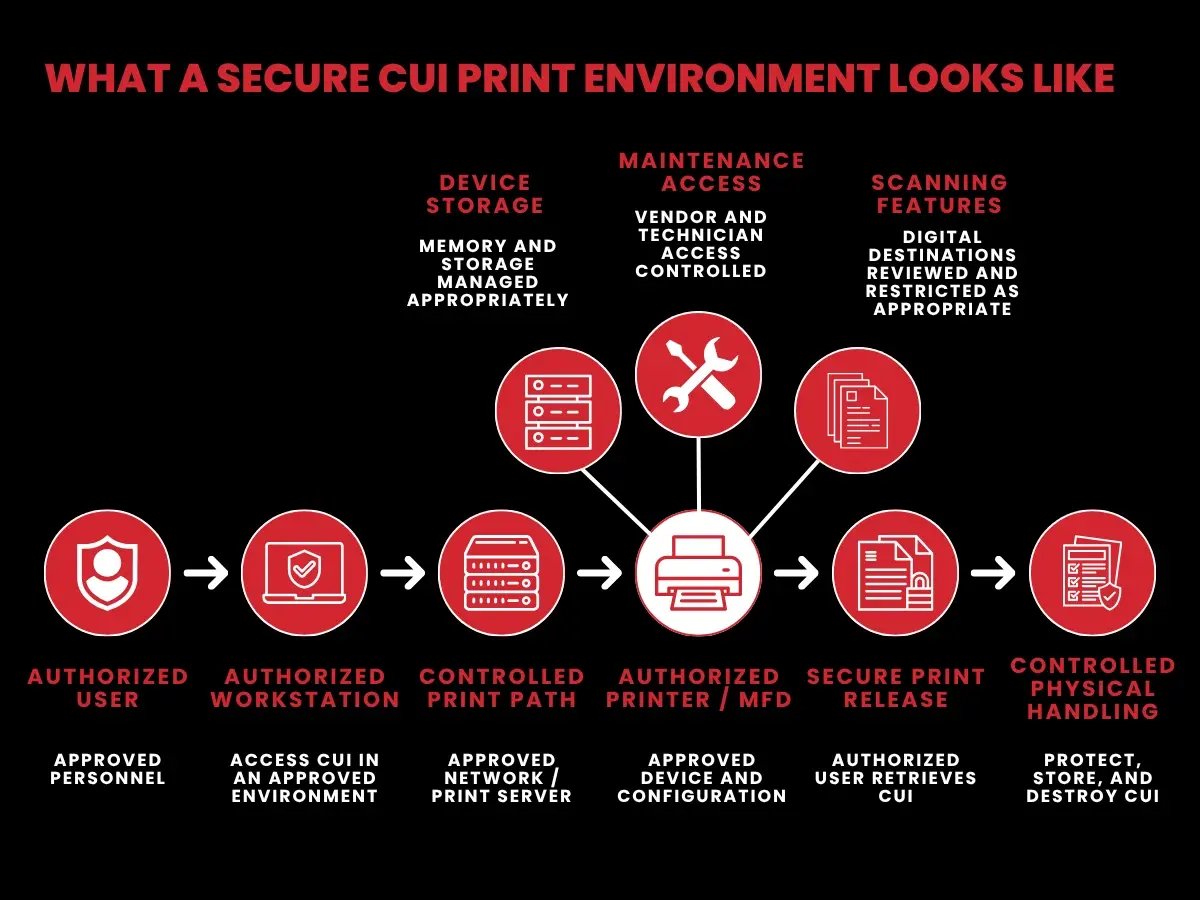
A secure CUI printing process should be supported by documented policies and procedures that reflect how printing actually occurs within the organization. The policy should address more than the handling of the final paper document. It should establish expectations for the people, devices, locations, and processes involved from the time CUI is sent to a printer through storage and final destruction.
Clear procedures also help employees understand what they are authorized to do and provide a consistent process the organization can demonstrate during an assessment.
Your CUI printing policy should address:
| When CUI may be printed: Define when printing is permitted based on business or operational needs and whether there are situations where printing should be limited. | |
| Who may print CUI: Identify the personnel or roles authorized to print and handle CUI. |
|
| Which printers are authorized: Specify which printers or multifunction devices may be used rather than allowing employees to select any available device. | |
| Which locations are approved: Define where CUI printing may occur, including offices, production areas, controlled facilities, and approved remote environments. | |
| Whether secure print release is required: Establish whether employees must authenticate at the printer using a badge, PIN, or another approved method before the document is released. | |
| How printer storage is managed: Address internal memory, hard drives, retained print jobs, print queues, and other storage capabilities that could contain information associated with CUI. | |
| Which scanning features are permitted: Define whether scan-to-email, scan-to-network-folder, scan-to-cloud, USB, fax, or similar multifunction features may be used with CUI. | |
| How maintenance and vendor access are handled:Establish procedures for technicians, remote support, repairs, replacement storage components, and other third-party access to printers that process CUI. | |
| How printed CUI may be transported: Define how employees protect physical documents when moving them between approved workspaces, facilities, or other authorized locations. | |
| How printed CUI is stored: Establish requirements for secure storage when documents are unattended, including temporary storage and clean desk expectations. | |
| How remote printing is handled: If remote or home printing is permitted, define which devices and locations are approved and how documents must be handled, stored, transported, and destroyed. | |
| How printers are sanitized or retired: Define what happens to internal storage or other components when printers are replaced, returned, repaired, reassigned, or disposed of. | |
| How printed CUI is destroyed: Establish approved destruction methods and procedures for documents awaiting destruction. | |
| How employees are trained: Ensure authorized personnel understand approved printers, document retrieval, storage, transportation, incident reporting, and destruction procedures. | |
| What evidence is maintained: Identify the documentation used to demonstrate that the printing process is implemented as described, such as approved device inventories, procedures, training records, configuration information, and other applicable records. |
Employee Accountability Still Matters
Policies and technical safeguards are effective only when employees understand their responsibilities. Personnel authorized to print CUI should know which devices they may use, how quickly documents should be retrieved, where printed CUI may be handled or stored, and what procedures apply when documents are transported or destroyed.
Employees should also know how to respond when the normal process breaks down. This includes a document sent to the wrong printer, CUI left unattended, a missing hard copy, or potential exposure to an unauthorized individual. Reporting procedures should be clear enough that employees know what action to take without having to make their own assumptions.
Policy Should Match Actual Practice
Written procedures should reflect how CUI printing actually works in the environment. If a policy states that CUI may only be printed on approved devices in controlled locations, employees should be able to identify those devices and follow that process consistently.
Organizations should periodically review their printing workflow to determine whether changes to printers, network configurations, remote work arrangements, multifunction features, or vendor relationships have created new CUI paths that are not reflected in existing documentation.
Key Takeaway: A CUI printing policy should answer more than “Are employees allowed to print?” It should define who can print, where they can print, which devices they can use, how the resulting documents are protected, and what happens when something goes wrong.
CUI Printing Checklist: What to Verify Before Allowing Printing
Before allowing CUI to be printed, organizations should understand the complete path the information will take and confirm that appropriate safeguards are in place. The review should cover more than the printer itself. It should consider the systems that process the print job, the device and its capabilities, the people who retrieve the document, and what happens to the physical copy afterward.
Use the following checklist to evaluate your CUI printing process:
Printer Authorization
| Is the printer or multifunction device approved for CUI? | |
| Is the approved device identified in the organization's documentation or asset inventory, as applicable? | |
| Do employees know which printers they are authorized to use? | |
| Are users prevented or instructed not to send CUI to unapproved shared printers? | |
| Is there a defined process for approving new or replacement printers? |
Why it matters: Employees may have access to multiple printers from the same workstation. The organization should know which devices are intended to process CUI and ensure employees understand those restrictions.
Physical Access
| Is the printer located in an appropriately controlled area? | |
| Is access limited to authorized personnel where required? | |
| Can visitors, vendors, or unauthorized employees reach the printer or output tray? | |
| Are printed documents protected from casual viewing? | |
| Are employees expected to retrieve CUI promptly? |
Why it matters: Even if the technical print path is controlled, the resulting document can still be exposed if anyone can approach the printer and retrieve or view the output.
Secure Print Release
| Is secure print release used where appropriate? | |
| Does the document remain queued until the authorized employee releases it? | |
| Is authentication performed using an approved method, such as a PIN, badge, or user credentials? | |
| Are employees instructed to remain responsible for retrieving their documents? | |
| Is there a procedure for CUI accidentally sent to the wrong printer? |
Why it matters: Secure release can reduce the amount of time sensitive documents remain unattended in an output tray.
Print Path and Network Infrastructure
| Does the organization understand how the print job travels from the workstation to the printer? | |
| Does the job pass through a print server? | |
| Are print queues or spool files created? | |
| Are other systems involved in processing or routing the print job? | |
| Is the print path accurately represented in relevant CUI data-flow or system documentation? |
Why it matters: Printing digital CUI is an information flow. The document may pass through multiple technical components before becoming a physical page.
Printer Memory and Storage
| Does the printer contain internal memory, a hard drive, solid-state storage, or other storage capabilities? | |
| Can print, copy, or scan jobs remain on the device after completion? | |
| Are retained jobs protected or removed according to the organization's procedures? | |
| Who can access stored jobs or device storage? | |
| Is storage considered when the printer is repaired, replaced, reassigned, returned, or retired? |
Why it matters: The physical document may be removed from the output tray while information associated with the job remains on the device.
Scanning and Multifunction Features
| Is scan-to-email reviewed and appropriately controlled? | |
| Is scan-to-network-folder reviewed? |
|
| Is scan-to-cloud functionality reviewed? | |
| Is USB functionality reviewed? | |
| Are fax, mobile printing, wireless connectivity, and other device features reviewed? | |
| Are unnecessary features disabled or restricted according to the organization's approved configuration? |
Why it matters: A multifunction device may create additional CUI paths. For example, scanning a printed CUI document to email or cloud storage creates a new digital copy that follows a different information path.
Maintenance and Vendor Access
| Is there a procedure for servicing printers that process CUI? | |
| Is third-party technician access controlled? | |
| Is remote administrative or vendor access addressed? | |
| Are administrative credentials appropriately restricted? | |
| Is internal storage considered before a device or component leaves the controlled environment? | |
| Are replacement storage components handled according to established procedures? | |
| Is printer retirement or disposal addressed? |
Why it matters: Maintenance can give technicians or service providers access to the device, its configuration, or components that may contain information associated with previous jobs.
Employee Handling
| Do employees know how quickly printed CUI should be retrieved? | |
| Do they know where the document may be used? | |
| Do they know who is authorized to view or handle it? | |
| Are procedures established for transporting printed CUI? |
|
| Do employees know what to do if a document is lost or misplaced? | |
| Do they know how to report CUI sent to the wrong printer or potentially exposed to an unauthorized individual? |
Why it matters: Once the document leaves the printer, employee handling becomes a central part of protecting it.
Physical Storage
| Is approved secure storage available for printed CUI? | |
| Are employees instructed where documents should be placed when unattended? | |
| Are clean desk expectations defined? | |
| Is temporary storage during meetings, breaks, and shift changes addressed? | |
| Are shared workspaces and conference rooms considered? | |
| If remote work is permitted, are home or remote storage requirements clearly defined? |
Why it matters: CUI can be exposed during short periods when an employee is no longer directly controlling the document, not just during long-term storage.
Destruction
| Are approved destruction procedures documented? | |
| Do employees know when and how printed CUI should be destroyed? | |
| Are documents protected while awaiting destruction? | |
| Are destruction containers appropriately controlled? | |
| Is access to documents awaiting destruction limited as appropriate? | |
| If a third-party destruction vendor is used, is that process addressed? | |
| Is appropriate documentation or evidence maintained where required by the organization's process? |
Why it matters: The CUI lifecycle does not end when a document is placed in a destruction bin. The information still requires protection until the approved destruction process is completed.
Training and Evidence
| Have authorized employees been trained on CUI printing procedures? | |
| Can employees identify approved printers and locations? | |
| Do employees understand handling, storage, transportation, and destruction procedures? | |
| Are relevant training records maintained? | |
| Can the organization provide documentation supporting its printing process? | |
| Does actual employee behavior match the documented procedure? |
Why it matters: A written procedure by itself does not demonstrate that the process is understood and consistently followed.
Quick Readiness Check: Can your organization clearly explain where CUI originates, how the print job reaches an approved printer, what the device may retain, who can retrieve the document, where the physical copy may be used and stored, and how it is ultimately destroyed? If any part of that process is unclear, that area may warrant additional review.
7 Common CUI Printing Mistakes
Even organizations with documented Controlled Unclassified Information (CUI) procedures can overlook risks within the printing process. These issues often occur when printing is treated as a routine office function rather than as another way CUI moves through the environment.
Here are seven common printing mistakes organizations should watch for.
Using Uncontrolled Shared Printers
Shared printers can create unnecessary exposure when CUI is sent to a device that is accessible to people who are not authorized to view the information.
For example, an employee may send a technical document to a printer in a common office area used by several departments. Before the employee retrieves it, another employee, visitor, contractor, or vendor could potentially see or remove the document.
Organizations should clearly identify which printers are approved for CUI and ensure employees know which devices they are authorized to use.
Better Practice: Identify approved printers, consider who can physically access them, and use appropriate controls to reduce the risk of CUI being retrieved by the wrong person.
Leaving CUI in the Output Tray
A secure printing process can still fail at the final step if the employee does not promptly retrieve the document.
An employee might send CUI to a printer and then become distracted by a call, meeting, or another task. During that time, the document may remain visible or accessible in the output tray.
Organizations should establish clear expectations for document retrieval and consider whether secure print release is appropriate for their environment.
Better Practice: Reduce the time between releasing a CUI print job and taking physical control of the document. Employees should also know what to do if a document is missing or accidentally sent to the wrong printer.
Overlooking Printer Memory and Storage
The physical document may not be the only place where information associated with a print job exists.
Printers and multifunction devices can include internal memory or storage used to process printing, copying, and scanning activities. Depending on the device and its configuration, information associated with previous jobs may remain after the printed document has been retrieved.
This should also be considered when a printer is serviced, replaced, reassigned, returned to a leasing company, or retired.
Better Practice: Understand the storage capabilities of printers that process CUI and incorporate those capabilities into device management, maintenance, and retirement procedures.
Failing to Control Maintenance and Vendor Access
Printers require maintenance, and service technicians may need access to device settings, internal components, storage, or administrative functions.
If a printer has processed CUI, organizations should understand what a technician or service provider may be able to access. The same consideration applies to remote support or administrative access provided by manufacturers and managed print service providers.
Waiting until a technician arrives to decide how access should be handled can create unnecessary uncertainty.
Better Practice: Establish procedures for printer maintenance and third-party access in advance, including how technicians are authorized, what they may access, how remote support is handled, and what happens if storage components or the entire device must leave the controlled environment.
Letting Scanning Create New CUI Paths
A multifunction device may be approved for printing, but that does not automatically mean every feature on the device should be used with CUI.
For example, scanning a printed CUI document can create a new digital copy:
Printed CUI → Multifunction Device → Scan to Email
The same issue can arise with scan-to-cloud, scan-to-network-folder, USB storage, fax, mobile applications, wireless connectivity, and other device capabilities.
These functions can create new paths for CUI that differ from the organization's approved printing workflow.
Better Practice: Review the full capabilities of multifunction devices and determine which printing, scanning, storage, and connectivity features are appropriate for CUI within the organization's environment.
Storing Printed CUI Improperly
Retrieving CUI from the printer does not end the need for protection. Printed documents can still be exposed when they are left unattended or stored in locations accessible to unauthorized individuals.
Common problem areas include documents left on desks, papers forgotten in conference rooms, open shelving, unsecured filing locations, shared workspaces, vehicles, and remote or home workspaces.
Temporary storage deserves attention as well. Even if an employee steps away for only a short period, printed CUI should be handled according to the organization's established physical safeguarding procedures.
Better Practice: Define where printed CUI may be used and stored, including what employees should do during meetings, breaks, shift changes, and other periods when they are no longer directly controlling the document.
Having Policies Without Evidence of Implementation
A written policy may describe how CUI should be printed, retrieved, stored, and destroyed, but the organization should also be able to demonstrate that those procedures are actually followed.
For example, a policy might state that CUI must be retrieved immediately from approved printers. If documents are regularly left unattended in output trays, the documented procedure and actual practice do not match.
The same issue can occur when a policy requires secure storage but employees leave documents on desks, or when certain scanning functions are restricted in policy but remain part of the normal workflow.
Evidence may include relevant policies and procedures, approved device information, employee training records, printer configuration information, maintenance procedures, and other documentation that supports how the organization actually manages CUI printing.
Better Practice: Make sure documented procedures, technical configurations, employee behavior, and supporting evidence reflect the same CUI printing process.
How Assessors May Evaluate Your CUI Printing Process
During a Cybersecurity Maturity Model Certification (CMMC) assessment, organizations should be prepared to demonstrate how their documented procedures, technical safeguards, physical protections, and employee practices work together to protect CUI.
For organizations that print CUI, this means being able to explain and demonstrate the process from the systems involved in creating the print job through the handling, storage, and eventual destruction of the physical document.
Documentation and Evidence Review
Assessors may examine documentation and other evidence to understand how the organization has implemented applicable CUI protection requirements.
Relevant evidence may include:
| Policies and procedures for printing and handling CUI | |
| System Security Plan (SSP) documentation |
|
| CUI data-flow and boundary documentation | |
| Approved printer or device inventories | |
| Physical security procedures | |
| Employee training records | |
| Relevant printer configuration information | |
| Maintenance and vendor access procedures | |
| Storage and destruction procedures |
The documentation should reflect the organization's actual environment. For example, if procedures state that CUI may only be printed using approved devices in controlled locations, the organization should be able to identify those devices and demonstrate how that process is implemented.
Organizations preparing for a CMMC assessment should therefore consider whether their evidence clearly supports how CUI is protected throughout its lifecycle.
Personnel Interviews
Assessors may interview personnel responsible for implementing or following security procedures to determine whether documented practices are understood and consistently applied.
Employees who print or handle CUI should be prepared to explain which printers they are authorized to use, how documents are retrieved, where printed CUI may be stored, and what happens when the information is no longer needed.
Employees should also understand what to do when the normal process does not go as planned. This may include sending a document to the wrong printer, discovering CUI left unattended, losing a hard copy, or identifying a potential unauthorized disclosure.
Employee explanations should be consistent with the organization's documented procedures and normal operating practices.
Testing and Observation
Assessors may also test implemented safeguards or observe how processes operate to determine whether actual practices align with documented requirements.
For CUI printing, this could involve reviewing how applicable safeguards are implemented around the printing environment and how employees carry out established procedures.
Organizations should be prepared to demonstrate relevant aspects of their environment, such as:
| How approved printers are identified | |
| How access to printers and output is controlled | |
| How employees retrieve printed CUI | |
| How printed CUI is protected when unattended | |
| Where hard-copy CUI is stored | |
| How documents awaiting destruction are protected | |
| How applicable printer features and configurations support documented procedures |
For example, if an organization has established procedures requiring printed CUI to be secured when unattended, its normal workplace practices should be consistent with those procedures.
Technical and Device Configuration
The printing process may involve technical components in addition to the physical document. Organizations should understand how digital CUI moves from an authorized system to the printer and which devices or services participate in that process.
Depending on the environment, this may include workstations, network connections, print servers, print queues, printers, multifunction devices, and internal device storage.
Organizations should also understand relevant device capabilities, including secure print release, administrative access, scanning functions, storage, network connectivity, and procedures for maintenance or retirement.
The goal is to ensure that the technical environment being demonstrated is consistent with the organization's documented CUI workflow and applicable security requirements.
Assessment Readiness Tip: Be prepared to demonstrate your CUI printing process, not simply describe it. Documentation, employee explanations, technical configurations, and day-to-day practices should present a consistent picture of how printed CUI is protected.
How Printing Can Affect CMMC Scope
Printing can affect CMMC scope because the Department of Defense (DoD) Level 2 Scoping Guide defines a CUI Asset as an asset that processes, stores, or transmits Controlled Unclassified Information (CUI). The guidance specifically includes printing as an example of processing CUI and paper documents as an example of storing CUI.
This means organizations should look beyond where the original digital file is stored. The systems and devices involved in creating the printed copy, along with the resulting physical document, should be considered when mapping how CUI moves through the environment.
Printing Can Extend the CUI Path
This becomes especially important when an organization uses cloud storage, an enclave, or Virtual Desktop Infrastructure (VDI) to limit where CUI can be accessed and processed.
For example, an employee may access CUI through a controlled virtual environment that prevents local downloads. If the environment still allows the employee to print the document through a local office printer, the information now follows an additional path outside the virtual environment.
CUI Enclave → User Session → Print Function → Print Server → Printer → Printed CUI
Even if the original file remains inside the enclave, the organization should understand which systems and devices participate in the print process and where the physical document can travel afterward.
MAD Security discusses this issue further in its guidance on why cloud storage does not automatically remove endpoints from CMMC scope. The article specifically identifies printing as one of the ways an endpoint can interact with CUI and notes that a defensible enclave requires controls over where CUI can be stored, processed, and transmitted.
A CUI Enclave Does Not End at the Digital Boundary
A properly designed enclave can help establish a defined environment for handling CUI. However, that boundary depends on controlling the ways information can move outside the protected environment.
Printing is one of those paths.
If users can redirect print jobs to local devices, use shared network printers, download documents before printing, or create additional copies through multifunction devices, those capabilities should be considered when evaluating how CUI actually moves through the environment.
The same principle applies after the document is printed. The physical copy may move into offices, meeting rooms, production areas, storage locations, or other approved workspaces. The organization's CUI documentation should reflect those actual workflows rather than focusing solely on the location of the original digital file.
Follow the Actual CUI Flow
Accurate scoping depends on understanding what users and systems can actually do with CUI.
An organization may intend for CUI to remain inside a specific enclave, but if employees can print through devices outside that environment, its documented data flow may not represent the complete process.
Organizations should understand where the print job originates, which systems process or route it, which printer receives it, whether the device retains information, and where the resulting physical document goes. They should also understand who can access the printed document, where it can be stored, and how it is ultimately destroyed.
Following this complete path can help identify systems, devices, physical locations, and processes that should be considered when documenting the CUI environment.
Scope Reminder: DoD scoping guidance expressly treats printing as a form of CUI processing and paper documents as a form of CUI storage. Your documented environment should therefore reflect the actual path CUI follows when digital information becomes a physical document.
Best Practices for Managing Printed Information
Organizations seeking to strengthen compliance and reduce risk should consider several practical safeguards.
 |
Use Controlled Printing Locations Dedicated or closely monitored printers help reduce opportunities for unauthorized access.
Controlled Unclassified Information should not be printed on publicly accessible devices.
|
 |
Implement Clean Desk Practices Documents should never be left unattended on desks, conference tables, or shared workspaces. Consistent clean desk practices reinforce accountability and reduce accidental exposure.
|
 |
Properly Identify and Store Documents Records should be marked appropriately and stored in secured containers or restricted-access locations when not actively in use.
|
 |
Use Approved Destruction Methods Organizations should establish destruction procedures that ensure information cannot be reconstructed, recovered, or accessed after disposal.
|
 |
Conduct Periodic Reviews Periodic inspections and internal audits can identify process breakdowns before they become assessment findings.
Regular reviews also reinforce employee awareness and support continuous improvement efforts.
|
Organizations that need ongoing compliance oversight often benefit from Virtual Compliance Management (VCM), which helps maintain documentation, evidence collection, and assessment readiness throughout the year.
What You Should Be Able to Demonstrate
CMMC assessment readiness involves more than having a written policy that says CUI is protected. Organizations should be prepared to demonstrate how their documented procedures, technical configurations, physical safeguards, and employee practices work together in the actual printing environment.
For CUI printing, the organization should be able to show that it understands the complete process. This includes where digital CUI originates, how a print job reaches an approved device, how access to the printer and resulting document is controlled, where printed CUI may be handled or stored, and how the document is ultimately destroyed.
Evidence should also support what employees describe during interviews and what an assessor may observe in the environment. For example, if a procedure states that CUI may only be printed on approved devices, the organization should be able to identify those devices and show that employees understand and follow that requirement.
The same principle applies to secure print release, printer storage, multifunction features, physical storage, vendor access, remote printing, and destruction. The specific evidence will depend on the organization's environment and the safeguards being assessed, but the documented process and actual practice should tell the same story.
Organizations should also review their printing environment when devices, configurations, work locations, vendors, or business processes change. A process that was accurately documented during initial implementation may no longer reflect how CUI is handled after the environment changes.
MAD Security's CMMC assessment readiness guidance provides additional information on preparing documentation and evidence for an assessment.
Readiness Check: Can your organization demonstrate how CUI moves from the digital environment to a printed document and provide evidence that the safeguards described in its policies are implemented in practice? Documentation, technical configurations, employee explanations, and day-to-day operations should align.
Follow the CUI, Not Just the File
Protecting Controlled Unclassified Information does not end when a digital file is stored in an approved system. Organizations need to understand where CUI can go, which systems and people interact with it, and what happens when that information moves from digital to physical form.
Printing makes that especially important. A single print job can involve an authorized workstation, network infrastructure, a print server, a printer or multifunction device, internal device storage, an output tray, employee handling, physical storage, and final destruction. Each stage becomes part of understanding how the organization protects CUI throughout its lifecycle.
The same principle applies to CMMC scope. An organization may establish a carefully defined digital boundary, but that boundary should reflect how CUI actually moves in practice. If users can print CUI, the printing workflow and resulting physical documents should be considered when mapping the organization's CUI environment.
That understanding also supports assessment readiness. Policies, technical configurations, employee practices, physical safeguards, and supporting evidence should present a consistent picture of how CUI is protected. Organizations should be prepared to explain the process and demonstrate that their documented procedures reflect their actual operating environment.
Ultimately, the question should not stop at “Where is the CUI file stored?” A more complete question is:
Where can the CUI go, who or what can interact with it, and how is it protected at every stage?
Following the CUI from its digital source through printing, handling, storage, and destruction can help defense contractors identify overlooked exposure points, maintain a clearer assessment boundary, and build a CUI protection process that can be demonstrated in practice.
For organizations reviewing their environment, accurate CUI scoping and data-flow mapping can help establish a clearer picture of where CUI enters, moves through, and exits the environment.
Need Help Validating Your CUI Environment?
Printing is only one part of the broader Controlled Unclassified Information (CUI) environment. If your organization allows CUI to move from digital systems into physical form, your documented scope should reflect the systems, devices, people, and processes involved throughout that workflow.
MAD Security can help defense contractors evaluate how CUI actually moves through their environment, from authorized systems and printing workflows to physical handling, storage, and final destruction. This includes identifying potential gaps between documented procedures and day-to-day operations and preparing the supporting evidence needed for CMMC assessment readiness.
Whether you are defining your CUI boundary, reviewing an existing printing process, or preparing for an assessment, understanding the complete CUI lifecycle can help you build a more accurate picture of your environment and the safeguards protecting it.
Ready to validate your CUI environment and prepare for CMMC? Learn more about MAD Security’s CMMC consulting services.
%20Graphics/CUI%20Checklist%20CTA%2001.png?width=500&height=261&name=CUI%20Checklist%20CTA%2001.png)
Frequently Asked Questions (FAQs)


